
Sending mass emails sounds simple until you hit the real problems: low opens, spam complaints, and emails that never make it to the inbox.
If you’ve ever thought, “I don’t want to annoy my list,” you’re already ahead of most people. Good mass email isn’t about blasting everyone. It’s about sending the right message to the right group at the right time, with clean data and a solid sending setup.
In this guide, we’ll cover the stuff that actually moves the needle: how to prep your list, how to segment like a pro, what to write (and what to stop writing), and how to read your results so your next send performs better. You’ll also learn the common mistakes that quietly wreck campaigns, even for experienced marketers.
Why sending mass emails still works
Sending mass emails is one of the few marketing moves you can still control.
Social platforms can change the rules overnight. Your reach drops, your ads get more expensive, and your best post gets shown to 3% of your followers. Cool.
Email doesn’t play that game.
When someone gives you their email address, you’re building an owned audience. That means you can reach them directly, on your schedule, without begging an algorithm for permission.
This is why smart marketers still lean on email even when they’re crushing it on other channels. Email isn’t “old.” It’s stable. And stability is what makes it scale.
Sending mass emails also works because it’s flexible. You can use it to:
- Announce something new
- Drive traffic to an offer
- Nurture leads that aren’t ready yet
- Re-activate people who went quiet
- Stay top-of-mind so you’re the obvious choice later
Here’s the key idea: mass emails don’t have to be “one message to everyone.” The best results usually come when you send one message to a specific group. That’s still a mass send. It’s just smarter.
And once you build a clean list, a simple segmentation system, and a repeatable send routine, email stops feeling like a chore. It becomes a weekly habit that produces clicks, replies, and sales.
What sending mass emails actually means
Sending mass emails doesn’t mean you write one generic email and hit send to everyone.
That’s what spammers do.
Real sending mass emails is closer to this: you have one goal, one message, and one specific group of people who should receive it. The “mass” part simply means you’re sending it to more than a handful of contacts at once.
There are two main types of mass email sends you should understand:
Broadcast emails
These are one-time sends. Think announcements, weekly newsletters, promo emails, event reminders, or “quick update” emails. They go out once, to a selected group, and then they’re done.
Automated email sequences
These are pre-written emails that trigger based on timing or behavior. Examples are welcome sequences, lead nurture sequences, follow-ups after a form submission, or re-engagement emails for inactive leads. They’re not “one big send,” but they scale like crazy because they run automatically.
Now, here’s the part most beginners miss.
If you’re sending mass emails without segmentation, you’re basically guessing. You might get some results, but you’ll burn your list faster. Segmentation is what keeps your emails relevant, and relevance is what protects deliverability.
Simple segmentation can look like:
- Leads vs customers
- People who clicked last time vs people who didn’t
- Interested in service A vs service B
- New leads in the last 30 days
- Tagged by lead source or campaign
So yes, you can send to thousands of people. But the best send usually feels personal because it’s aimed at the right slice of your list.
Common mistakes when sending mass emails
Most people don’t fail at sending mass emails because they “can’t write.”
They fail because they skip the boring stuff that protects your deliverability and your list.
Here are the big mistakes to avoid.
Sending to people who never asked for your emails
If you’re emailing a purchased list, a scraped list, or an old list you haven’t contacted in forever, you’re playing with fire. You’ll see bounces, complaints, and unsubscribes fast. That’s how domains get burned.
Not cleaning your list before you send
Bad emails on your list don’t just “not receive” your message. They hurt your sender reputation. That means even your good contacts may stop seeing your emails in the inbox over time.
Sending one message to everyone
This is a silent killer. When people don’t care about the email, they ignore it. When enough people ignore it, inbox providers get the message: “this sender isn’t important.” Your future emails get shoved into Promotions or Spam. Segmenting fixes this.
Writing like a brochure
Long intros. Too many links. Big blocks of text. A bunch of “we’re excited to announce…” fluff. People don’t read that. Keep it clear. One topic. One outcome. One next step.
Overloading the email with images and fancy design
Design isn’t the enemy. But heavy image emails can cause tracking and deliverability issues, and they often load slow on mobile. If your email only makes sense with images turned on, you’re already losing.
No clear call-to-action
If you want clicks, ask for one action. Not five. One email = one goal. Make the next step obvious.
Sending too much, too fast, from a cold domain
If you’re new or you haven’t emailed in months, blasting thousands of contacts in one go is a great way to get flagged. You want a steady ramp-up and consistent sending patterns.
Not tracking results or learning anything
If you don’t check opens, clicks, bounces, unsubscribes, and replies, you’re flying blind. Your data tells you what to fix before the next send.
Best practices before you send anything
If you want better results from sending mass emails, win the setup first. This is the part that keeps you out of spam and keeps your list happy.
Start with list quality, not volume
A smaller clean list will usually beat a giant messy list. Every time. Focus on people who actually want to hear from you.
Confirm you have real consent
If you’re importing contacts, make sure they opted in or have a clear relationship with you. Consent protects your sending reputation and helps avoid bounce and spam issues.
Clean and verify your list
Before a big send, remove:
- Obvious typos (gmial.com, hotnail.com, etc.)
- Role emails that often cause problems (info@, support@) unless they truly opted in
- Old contacts who never engaged (especially if you haven’t emailed them in months)
Segment your audience
You don’t need 20 segments to start. You need 2–5 good ones. Examples:
- New leads (last 30 days)
- Active leads (clicked or replied in the last 60–90 days)
- Customers
- Cold leads (no opens/clicks in 90+ days)
Set one goal per email
Pick one outcome:
- Get a click
- Get a reply
- Get a booking
- Get a purchase
Then write the email so everything points to that one action.
Write like a human, not a brand
Short sentences win. Clear subject lines win. A helpful tone wins. If your email sounds like a press release, it’s going to get ignored.
Test before you blast
Do a quick internal test:
- Send to yourself on Gmail and Outlook if you can
- Check mobile formatting
- Click every link
- Make sure the unsubscribe link exists and works
Be consistent with your sending rhythm
Inbox providers love patterns. If you send once a week, keep it once a week. If you send daily, keep it steady. Random “silent for 2 months then blast 10,000” is a deliverability nightmare.
Choosing the right email platform
Here’s the truth.
Your results from sending mass emails won’t come from some magic button inside a platform. They’ll come from the basics we just covered: clean lists, smart segmentation, clear copy, and consistent sending habits.
But… your platform still matters.
Because if the tool makes the workflow painful, you won’t do it consistently. And if it can’t handle the essentials, you’ll end up guessing instead of improving.
When you’re picking an email tool (any tool), make sure it can do these things well:
- List management that doesn’t turn into a mess
- Segmentation you can actually use (tags, filters, smart lists, activity-based targeting)
- Easy email building (templates or simple layouts)
- Scheduling and controls for when a send goes out
- Reporting so you can see opens, clicks, bounces, and unsubscribes
- Unsubscribe handling that’s automatic and compliant
Now, there are a lot of platforms that can send email.
The reason we’re going to use GoHighLevel (GHL) in the next section isn’t because it’s “the best for everyone.” It’s because it’s a common tool for agencies and online marketers, and it includes the core stuff you need in one place: contacts, segmentation, email campaigns, and tracking.
So think of the next section as a practical walkthrough.
If you’re already using GoHighLevel, you can follow it step by step.
If you’re using a different platform, you can still copy the exact process. The buttons will just be in different spots.
How to start sending mass emails in GoHighLevel
Sending mass emails effectively requires a clear path from organizing your contacts to hitting the send button. This guide covers the essential phases to get your message out:
- Access the Contacts area to find your leads.
- Build a targeted recipient list using Smart Lists.
- Navigate to the Email Marketing section.
- Create a new Email Campaign.
- Write and design your email content.
- Set your email details and select your audience.
- Track your results to improve future performance.
To start, make sure you are logged in to your GoHighLevel sub-account.
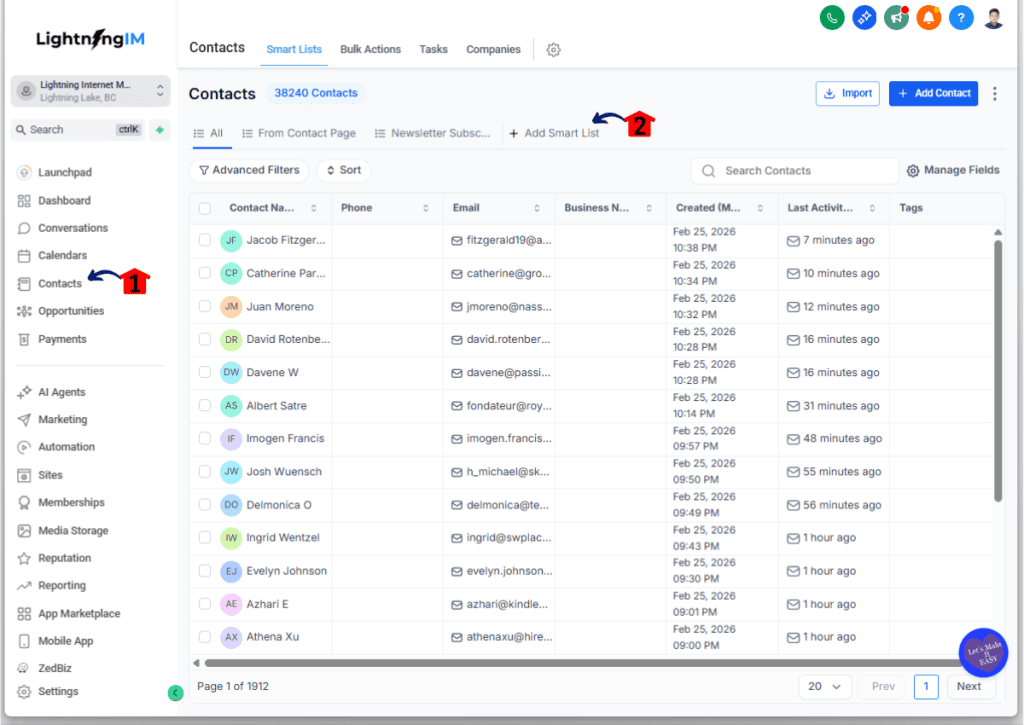
Step 01 – Access the Contacts page of GoHighLevel
The Main Menu on the left side of your screen has all the main areas that you work in when using GHL.
1.1 Click the Contacts main menu item.
- This section houses every lead, customer, and prospect you have collected.
1.2 Click the Smart Lists tab at the top of the page.
- Smart Lists help you group people together based on specific traits so your sending mass emails efforts are not wasted on the wrong audience.
Step 02 – Build a targeted recipient list
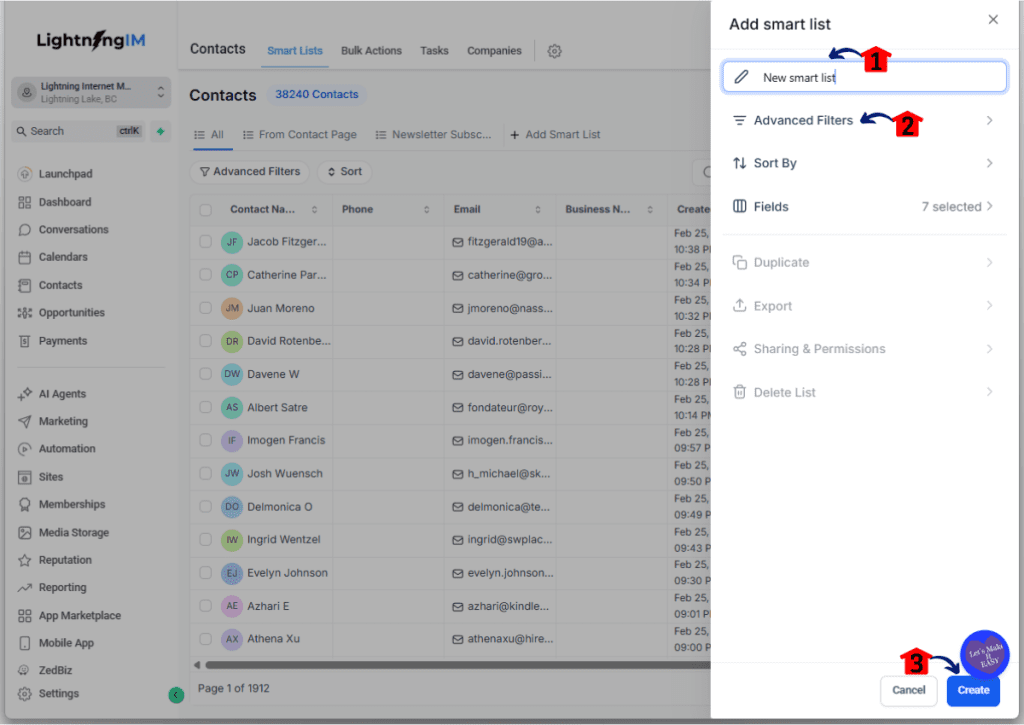
Before you send anything, you need to know who is getting it. A focused list is always better than a giant, messy one.
2.1 Enter a clear name for your Smart List.
2.2 Apply filters for the specific contacts you want in this list.
- You can filter by tags, location, or even the date they were added to your system.
2.3 Click the Create button to save.
Step 03 – Access the Email Marketing area
Now that your list is ready, you need to head over to the tools that actually build the email.
3.1 Click on the Marketing menu item in the left-hand menu.
3.2 Click on the Emails tab.
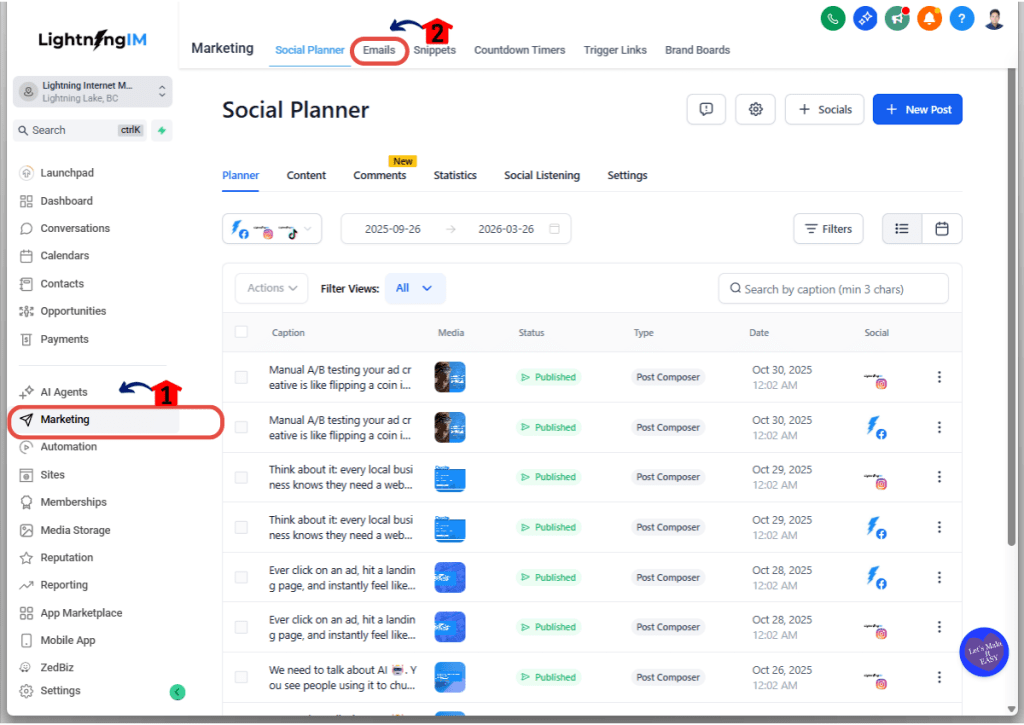
Step 04 – Create an Email Campaign
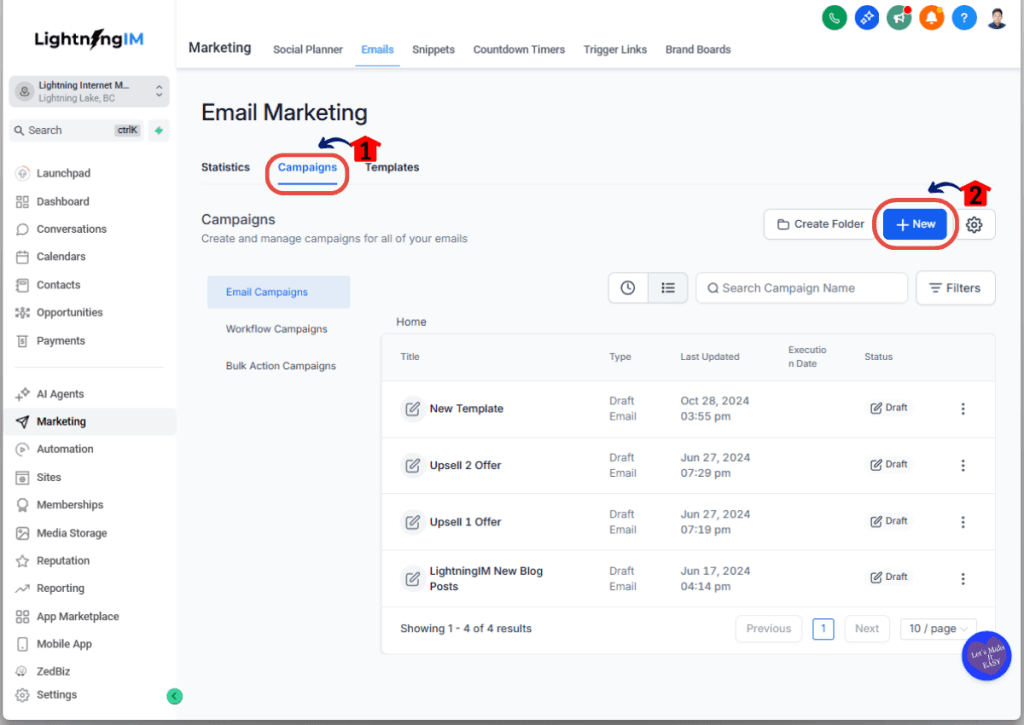
This is where you start the actual project of building your outgoing message.
4.1 Click the Campaigns tab at the top.
4.2 Click the new button to start creating your new email.
- Select if you want to build an email using existing templates or from scratch. Templates are great for saving time, while starting from scratch gives you a blank canvas.
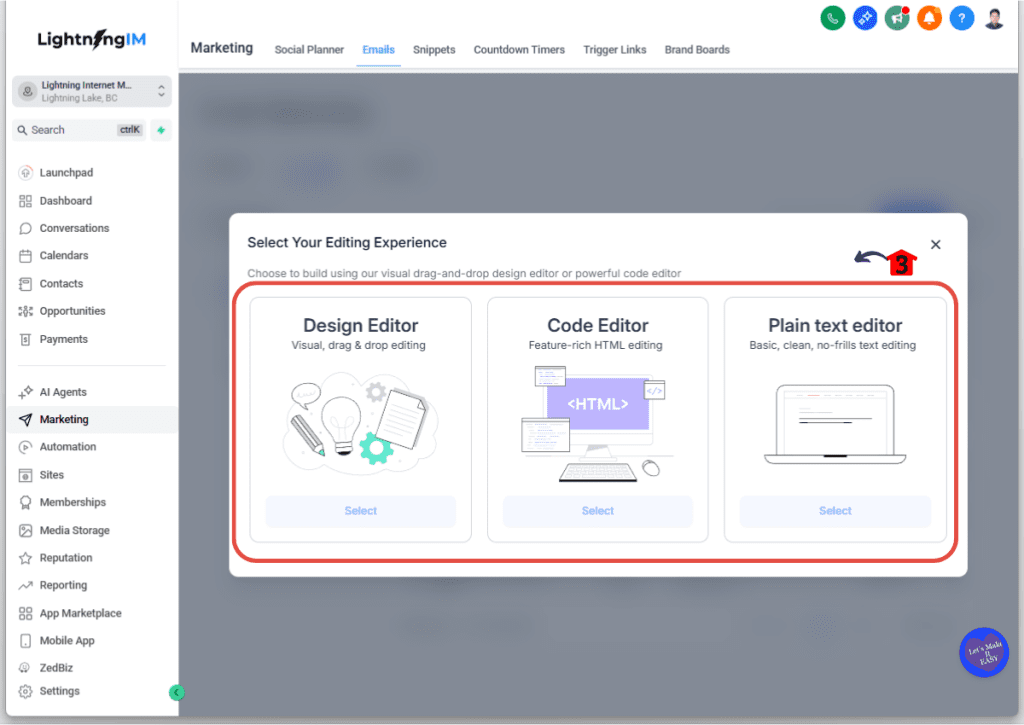
4.3 Select the type of builder you want to use.
- Most users prefer the Design Editor because it is a simple drag and drop tool.
Step 05 – Write and design the email
Keep your message simple and direct. People are busy, so get to the point quickly.
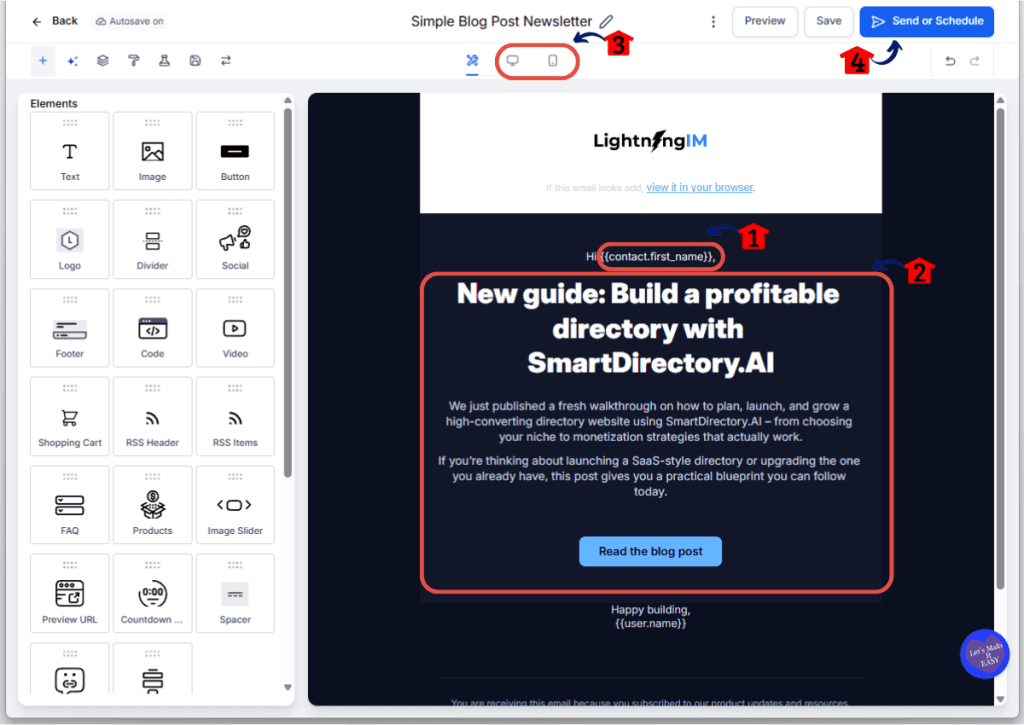
5.1 Add custom fields like the contact first name to make the email feel personal.
- Using “Hey {{contact.first_name}}” is usually enough to grab their attention without being creepy.
5.2 Write the body of the email with one main idea and one clear call to action.
- Do not confuse your readers with five different links. Tell them exactly what you want them to do next.
5.3 Check the formatting using the desktop and mobile preview tools.
- Many people read emails on their phones, so make sure your text is not too small and your images look good.
5.4 Click the Send or Schedule button once your design is finished.
Step 06 – Set email details and recipients
This is the final checklist before your email goes live to the world.
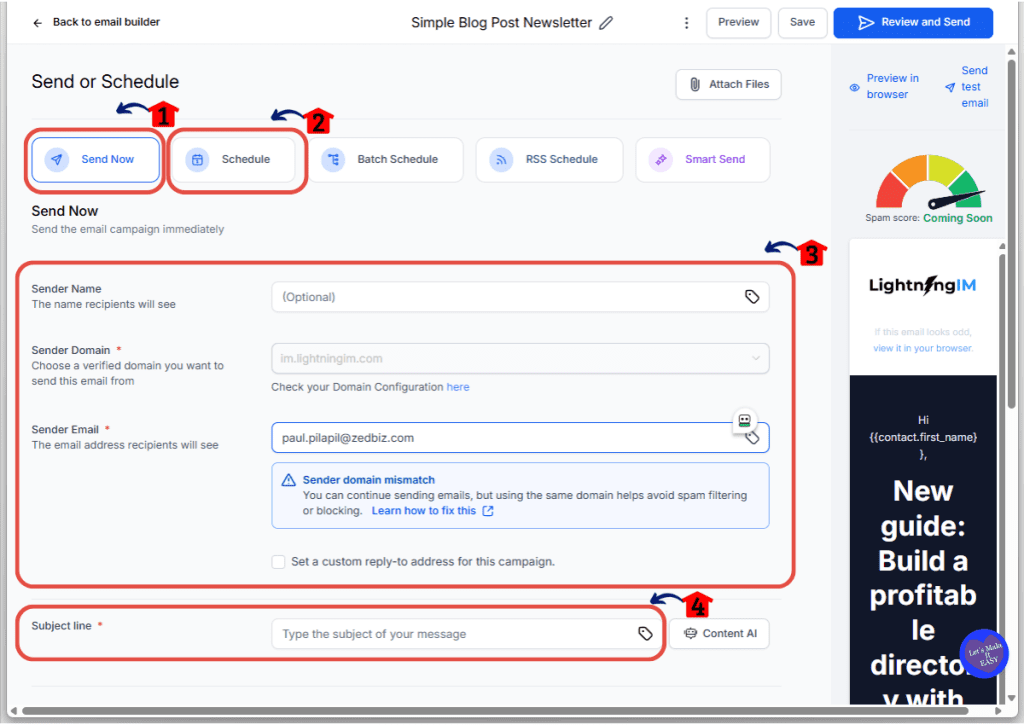
6.1 Choose Send Now if the message is urgent.
6.2 Choose Schedule if you want to pick a specific date and time for the email to go out.
6.3 Review the sender details to ensure your name and email address are correct.
6.4 Enter a catchy Subject Line.
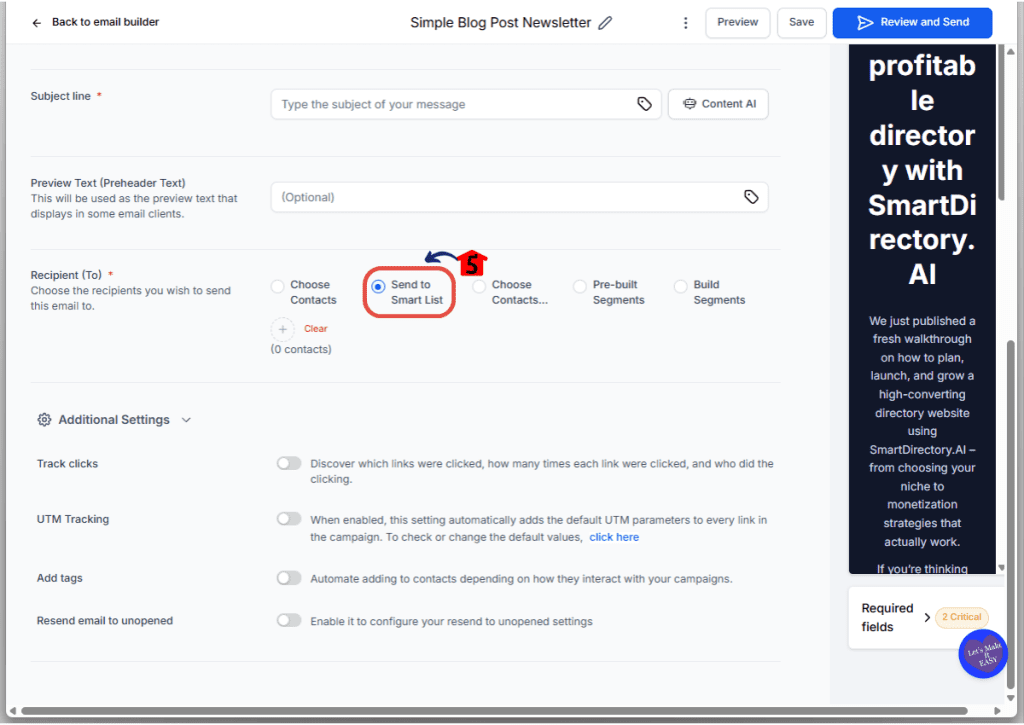
6.5 Scroll down and select your recipient by choosing Send to Smart List.
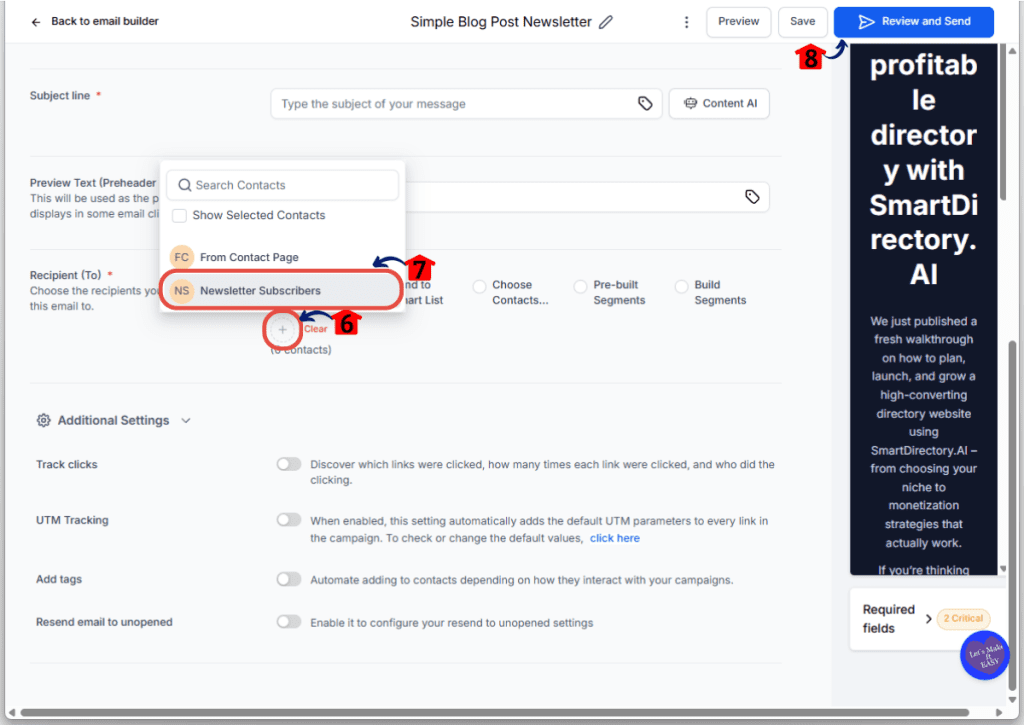
6.6 Click the + icon
6.7 Choose the Smart List you created in Step 02.
6.8 Finally, click the Review and Send button to do one final check before the system starts sending.
Step 07 – Track results and improve the next send
Your job is not done once the email is sent. You need to see what worked and what did not.
7.1 Review the Opens and Clicks after the first few hours.
- High opens mean your subject line worked. High clicks mean your content was interesting.
7.2 Check for Bounces and Unsubscribes.
- Remove these contacts immediately to keep your email reputation healthy.
7.3 Tag the people who clicked your links.
- By tagging active users, your next campaign for sending mass emails can target your most engaged fans first.
Pro tips to improve sending mass emails
If you want sending mass emails to feel easy and get better results over time, you need a few simple habits that compound. Here are the ones that matter most.
Send to engaged people first
If you’re sitting on a big list, don’t start by emailing everyone. Start with the segment that’s most likely to open and click. That early engagement helps inbox placement, and it gives you cleaner data faster.
Keep your emails short on purpose
Most “marketing emails” are too long. A tight email usually wins because it’s easier to read on mobile and faster to act on.
A solid structure looks like this:
- One line opener
- One short story, insight, or offer
- One clear call-to-action
Write subject lines that match the email
If your subject line feels clickbait-y but the email is calm and helpful, people get annoyed. The best subject lines are specific and honest. If you wouldn’t say it to a real person, don’t put it in the subject line.
Segment by intent, not just demographics
Beginners often segment by “lead vs customer” and stop there. Better segments are based on behavior:
- Clicked last email
- Visited a key page
- Booked a call before
- Has tag for a specific service interest
Use a simple re-engagement routine
Every 60–90 days, run a short re-engagement campaign to people who haven’t opened or clicked. If they stay cold, stop emailing them. It sounds harsh, but it protects your deliverability and keeps your list healthier.
Don’t change everything at once
If one send underperforms, don’t rewrite your whole strategy. Change one thing:
- Subject line style
- Offer angle
- Segment
- Send time
Then compare results.
Make your next campaign easier with tagging
After each campaign, tag:
- Clickers
- Buyers
- Replyers
- Unsubscribers (or just ensure they’re suppressed)
That turns sending mass emails into a system, not a one-off scramble.
What sending mass emails means for your business
If you get sending mass emails right, it stops being “another marketing task” and starts acting like a real business asset.
Because now you’ve got a direct line to people who already know you.
That changes a few things fast.
You get more predictable traffic
Instead of hoping your next post performs, you can send a campaign and drive clicks the same day. That’s huge when you need momentum for:
- A launch
- A promo
- A webinar
- A last-minute fill for your calendar
You nurture leads while you sleep
Most leads don’t buy right away. They forget, get busy, and compare options. Email lets you stay in the picture without chasing them down one by one.
And when the timing is right, you’re the one they reply to.
You lower your dependency on ads
Ads are great. But they’re not stable. Costs go up. Results fluctuate. Accounts get restricted. Email helps smooth that out because you’re building something you control.
Even if ads are your main growth channel, sending mass emails is what helps you monetize that traffic better.
You build trust at scale
Trust is usually built through repetition. Showing up consistently. Teaching something useful. Sharing real results. Email is one of the best places to do that because people read it in a quieter moment, not while they’re doom-scrolling.
You also get clearer data
Email is a feedback machine. Opens, clicks, replies, unsubscribes, bounces. That’s the market telling you what it wants and what it’s tired of.
And once you listen to that data, each send gets easier and more profitable.
Real-time application for business
Here’s where sending mass emails stops being theory and starts making you money.
These are real scenarios you can copy, even if your audience is small right now. The goal is to build a repeatable “send rhythm” that fits your business, not random blasts whenever you remember email exists.
Scenario 1: The weekly value email that keeps you top-of-mind
This is the simplest and most powerful habit.
Send one helpful email every week:
- A quick lesson
- A short case study
- A mistake to avoid
- A simple checklist
- A tool or template that saves time
Why it works: people may not buy today, but they remember who consistently helps them. When they’re ready, they reply.
Scenario 2: The “open cart” promo sequence
If you’re selling anything with a limited window, use a short promo run.
Example schedule:
Day 1: Offer announcement
Day 2: Answer common objections
Day 3: “Last day” reminder
Keep it clean. Keep it honest. Don’t pretend it’s closing if it isn’t.
Scenario 3: The lead magnet follow-up that turns downloads into calls
Someone downloads your lead magnet. Great.
Most marketers stop there.
Instead, send a short follow-up series that:
- Teaches one quick win
- Asks what they’re stuck on
- Offers the next step (book a call, watch a demo, reply with a keyword)
This is where sending mass emails becomes a pipeline builder, not just “email marketing.”
Scenario 4: The reactivation campaign for cold subscribers
If a chunk of your list hasn’t opened in 90+ days, don’t keep blasting them.
Run a simple reactivation campaign:
Email 1: “Still want these?” (set expectations, ask them to click or reply)
Email 2: Share your best resource from the last 30 days
Email 3: “I’m cleaning the list” (last chance to stay)
Then suppress or remove the ones who never engage. It protects your deliverability.
Scenario 5: The client update email for agencies
Agencies can use mass email in a non-sales way too.
Send monthly updates like:
- What’s working in campaigns right now
- A new landing page idea
- A reporting snapshot
- A simple “here’s what we’re doing next” note
This reduces churn because clients feel informed and supported.
Scenario 6: The event or webinar fill campaign
If you run webinars, workshops, or local events, email is still the fastest way to fill seats.
Send:
- Invite email (clear outcome + who it’s for)
- Reminder email (24 hours)
- Final reminder (1–3 hours)
If you’re doing this inside GoHighLevel, your Smart Lists and tags make it easy to target only the right people, and to follow up differently with registrants vs no-shows.
Frequently asked questions about sending mass emails
What’s the difference between sending mass emails and spam?
Intent and consent. Spam is unsolicited, irrelevant, and usually sent to a messy list. Sending mass emails is permission-based and targeted. If people opted in (or have a real relationship with you), your content is relevant, and you include an unsubscribe option, you’re on the right side of the line
How many emails can I send at once without getting in trouble?
There’s no magic number. It depends on your domain reputation, list quality, and how consistent you’ve been. If you’re new or you haven’t emailed in months, start smaller and ramp up. If you’ve been sending consistently, you’ll have more flexibility.
Should I email my entire list or only a segment?
Start with a segment unless your message truly applies to everyone. Segments usually get higher opens and clicks, and that improves your long-term inbox placement. If you want better results from sending mass emails, segmentation is one of the fastest wins.
Do I need permission to email people I met through networking or a call?
Usually, yes. If they clearly asked to hear from you, great. If not, don’t assume. A safe approach is to send a direct 1-to-1 follow-up asking if they want updates, or use a simple opt-in form. It’s not just about rules. It’s about trust.
Why are my open rates suddenly dropping?
Common causes are: list fatigue (you’re emailing too often or not relevant), weak subject lines, poor segmentation, or deliverability issues. Also, email privacy features can make opens less reliable. Use clicks and replies as stronger signals.
What’s a “good” open rate and click rate?
It varies by industry and list type. A better question is: are your numbers improving over time and are you getting the action you want (clicks, replies, bookings, purchases)? Focus on trends, not ego metrics.
Plain text or designed emails—what’s better?
For many marketers, simple wins. Plain-text style emails often feel more personal, load faster, and keep the focus on the message. Designed emails can work great for e-commerce and catalogs. The best choice is the one your audience responds to.
How often should I clean my email list?
At least every 60–90 days if you’re sending regularly. If you’re doing bigger sends, clean before the send. Removing unengaged or invalid emails helps protect deliverability and improves results from sending mass emails.
What should I do with people who never open my emails?
Don’t keep blasting them forever. Run a short re-engagement campaign, then suppress or remove the ones who still don’t engage. This protects your sender reputation and keeps your active subscribers getting your emails.
What if people mark my email as spam?
That’s a big red flag. It usually means your list quality is poor, your targeting is off, or your emails feel unexpected. Tighten segmentation, confirm consent, improve relevance, and consider reducing volume until engagement improves.
Can I automate follow-ups after a mass email?
Yes, and it’s smart. A simple approach is to create different follow-ups for people who clicked vs didn’t click. This is where sending mass emails becomes a system instead of a one-time blast.
How do I send mass emails in GoHighLevel without making it complicated?
Keep it simple: build a Smart List segment, create one email with one goal, confirm your sender details, schedule or send, then review results and tag clickers for next time. The workflow is straightforward once you repeat it a few times.
If I’m a beginner, what’s the fastest way to improve results?
Do three things: clean your list, send to a smaller engaged segment first, and write shorter emails with one clear call-to-action. Those three fixes alone can dramatically improve your next campaign.
Conclusion
Sending mass emails isn’t about blasting your whole list and hoping for the best. It’s about being intentional.
If you remember nothing else from this guide, remember this: list quality and relevance beat volume every time.
Here’s a simple way to take action today:
- Pick one goal for your next email.
- Build one small, targeted segment of engaged contacts.
- Write one short email with one clear call-to-action.
- Send it, track it, and improve one thing on the next send.
If you’re using GoHighLevel, the process is straightforward once you repeat it a few times. Smart Lists, tags, and campaign reporting make it easier to stay organized and keep improving without turning email into a full-time job.
And that’s the real win. Sending mass emails becomes a system you can run weekly, not a stressful “maybe I should email my list” moment once every few months.
What kind of email are you sending first: a weekly value email, a promo, or a re-engagement cleanup send?