
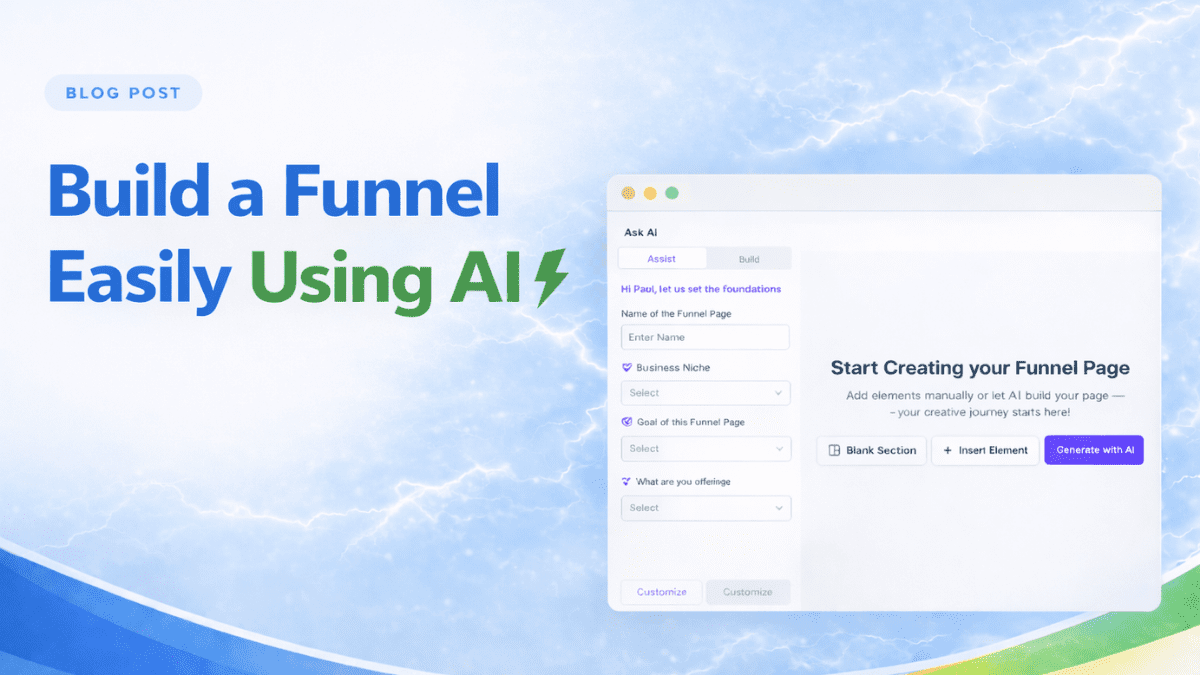
A lot of business owners never finish their first funnel because they make one mistake right out of the gate. They try to build the whole thing from zero.
You open GoHighLevel, click into funnels… and then what? Blank page. Too many options. Too many decisions. Next thing you know, you’ve spent an hour adjusting fonts and still don’t have anything that actually works.
That’s where the GoHighLevel AI funnel builder changes the game.
Instead of starting from scratch, the GoHighLevel AI funnel builder gives you something to work with right away. It builds out pages, structure, and even some copy so you’re not stuck guessing what goes where.
Now, is it perfect? No. But that’s not the point.
The goal here isn’t perfection. It’s momentum.
In this guide, I’ll show you how to use the GoHighLevel AI funnel builder to get your first funnel up and running, what to fix after it generates your pages, and how to avoid the common mistakes that slow most beginners down.
Watch: Build Funnels Faster with GoHighLevel AI Funnel Builder
Watch the tutorial below to see exactly how to turn the feature on, use it inside a sub-account, generate your funnel, edit it with Chat Mode, and publish it.
What You’ll Learn:
- How to activate GoHighLevel AI Funnel Builder
- How to enable it for sub-accounts
- How to create a funnel with Funnel AI (beta)
- How to refine and publish your page faster
Why Most People Get Stuck on Their First Funnel
Here’s the truth most people won’t say out loud.
Building your first funnel is not hard because you lack skill. It’s hard because you’re trying to make too many decisions all at once.
You’re thinking about design, copy, layout, pages, automation… all before you even have a basic funnel live. That’s where most people freeze.
And when you start from a blank page, it gets worse.
With no structure to guide you, you end up:
- overthinking every section
- second-guessing what pages you need
- tweaking small details that don’t even matter yet
That’s exactly why tools like the GoHighLevel AI funnel builder exist.
The GoHighLevel AI funnel builder removes that blank-page problem by giving you a working starting point. Instead of guessing what your funnel should look like, you get a structure you can actually see and improve.
And that shift matters more than most people realize.
Because once you have something in front of you, even if it’s not perfect, you can:
- edit it
- simplify it
- improve it
That’s a lot easier than building everything from nothing.
So if you’ve been stuck trying to “figure it all out” before launching anything, it’s not you.
You just need a better starting point.
And that’s exactly where the GoHighLevel AI funnel builder comes in.
What the GoHighLevel AI Funnel Builder Actually Does
Let’s keep this simple.
The GoHighLevel AI funnel builder is not some magic button that builds a perfect funnel while you sit back and relax.
What it does is way more useful than that.
It gives you a real starting point.
When you use the GoHighLevel AI funnel builder, you’re not building page by page from scratch. Instead, you:
- answer a few prompts about your business or offer
- choose what kind of funnel you want
- let the system generate the basic structure for you
And just like that, you go from nothing… to a funnel you can actually see and work on.
That includes:
- page layouts
- basic sections (headline, offer, call to action)
- starter copy you can tweak
Now here’s the important part most people miss.
The GoHighLevel AI funnel builder is not meant to replace your thinking. It’s meant to remove the hardest part… getting started.
Because once the funnel is generated, everything becomes easier:
- editing feels simpler
- decisions feel clearer
- progress happens faster
It’s the difference between:
👉 staring at a blank screen
👉 vs. improving something that already exists
And for beginners, that’s huge.
So instead of asking, “How do I build a funnel from scratch?”
You’re now asking, “How do I make this funnel better?”
That small shift is what helps you actually finish your first funnel using the GoHighLevel AI funnel builder.
How to Use the GoHighLevel AI Funnel Builder
The GoHighLevel AI funnel builder helps you move from a blank page to a working funnel much faster. In this how-to section, you’ll turn on the feature inside Agency Settings, choose which sub-accounts can use it, and then build your first funnel inside the Sites area. If you want a practical way to start using the GoHighLevel AI funnel builder without guessing where each setting lives, these steps will walk you through it clearly.
Once the feature is active, you can use the GoHighLevel AI funnel builder to generate funnel content, shape the page with AI tools, and publish it when everything looks right. The process starts in Agency View and ends inside a sub-account, where the GoHighLevel AI funnel builder gives you two ways to create your funnel based on how much help you want from AI.
- Access the Settings Area in GoHighLevel.
- Enable the AI Funnel Builder feature in Labs.
- Select sub-accounts that can access AI Funnel Builder.
- Open the Funnels area inside the sub-account.
- Start a new funnel with Funnel AI (beta).
- Generate your funnel content with Assist or Build mode.
- Refine your page and publish the funnel.
To start make sure you are logged in to your GoHighLevel sub-account.
Step 01 – Access the Settings Area in the Agency Dashboard
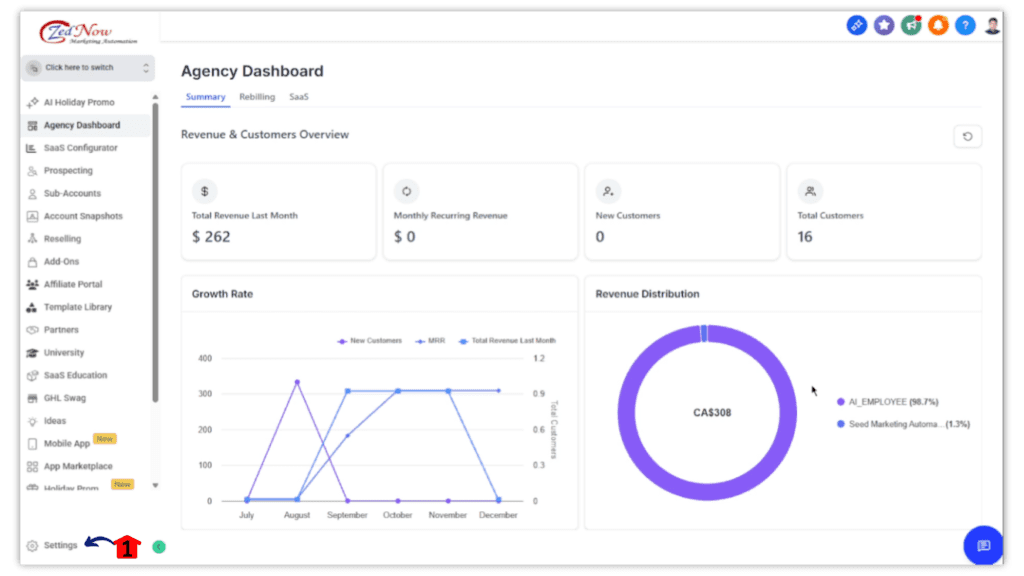
In your GoHighLevel agency dashboard, go to the left-hand sidebar and scroll all the way to the bottom.
1.1 Click the Settings gear icon.
- You’ll now be in the main Settings dashboard in Agency View, where you can access feature controls for the GoHighLevel AI funnel builder.
Step 02 – Enable the AI Funnel Builder feature in Labs
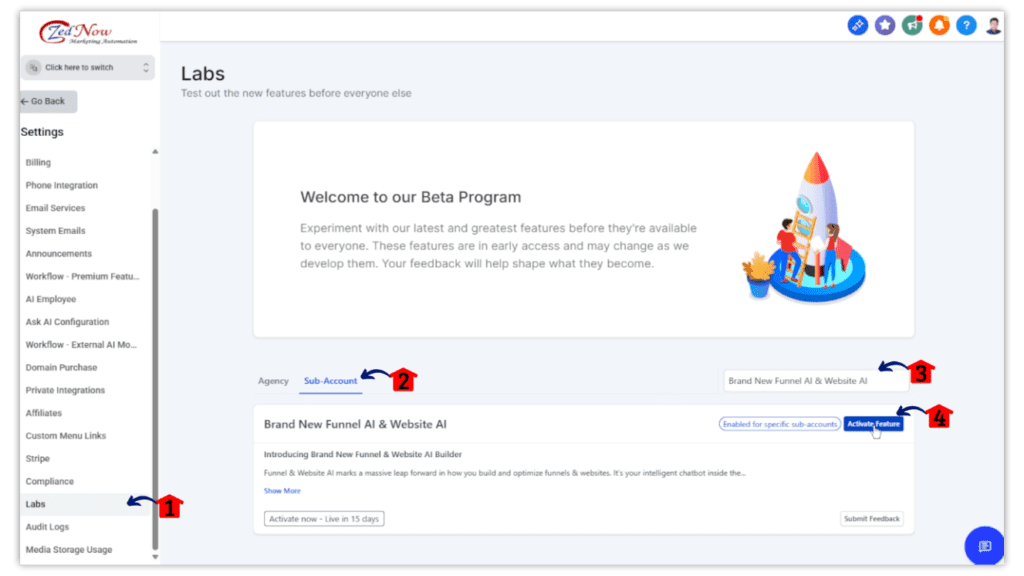
From the Settings dashboard, open the Labs area where beta features are managed.
2.1 Click the Labs menu item in the left sidebar.
- This opens the Labs page where available features are listed.
2.2 Click the Sub-Account tab.
- This switches the view so you can manage feature access for sub-accounts.
2.3 Search for the AI Funnel Builder feature.
- This helps you find the GoHighLevel AI funnel builder feature faster if multiple lab features are listed.
2.4 Click Activate Feature.
- This turns on the feature so you can assign access to selected sub-accounts.
Step 03 – Select sub-accounts that can access AI Funnel Builder
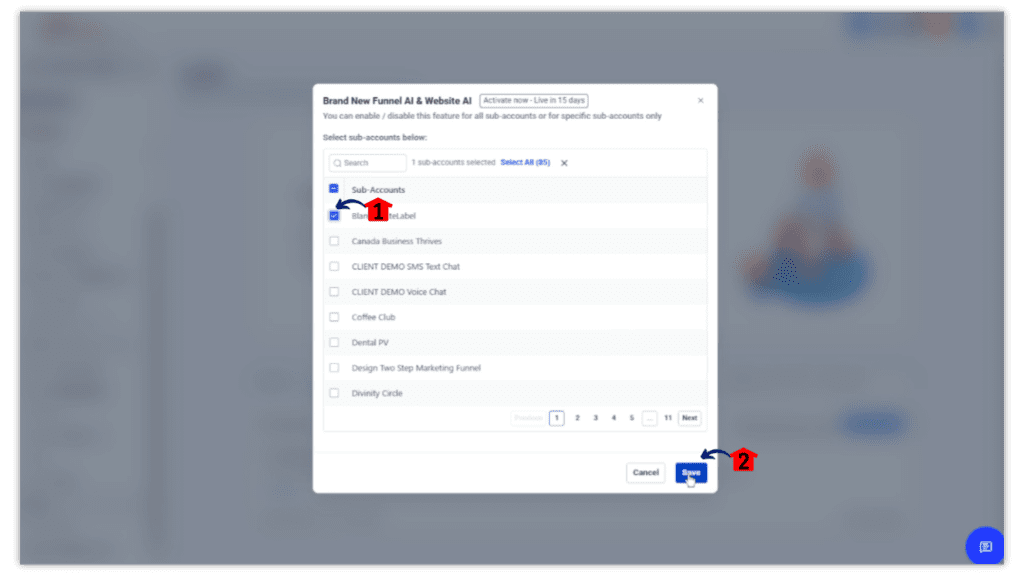
After activation, choose which sub-accounts can use the feature.
3.1 Select the sub-accounts that should have access to the GoHighLevel AI funnel builder.
3.2 Click Save.
- Your selected sub-accounts will now be able to access the feature.
Step 04 – Open the Funnels area inside the sub-account
Now move into the sub-account where you want to build your funnel.
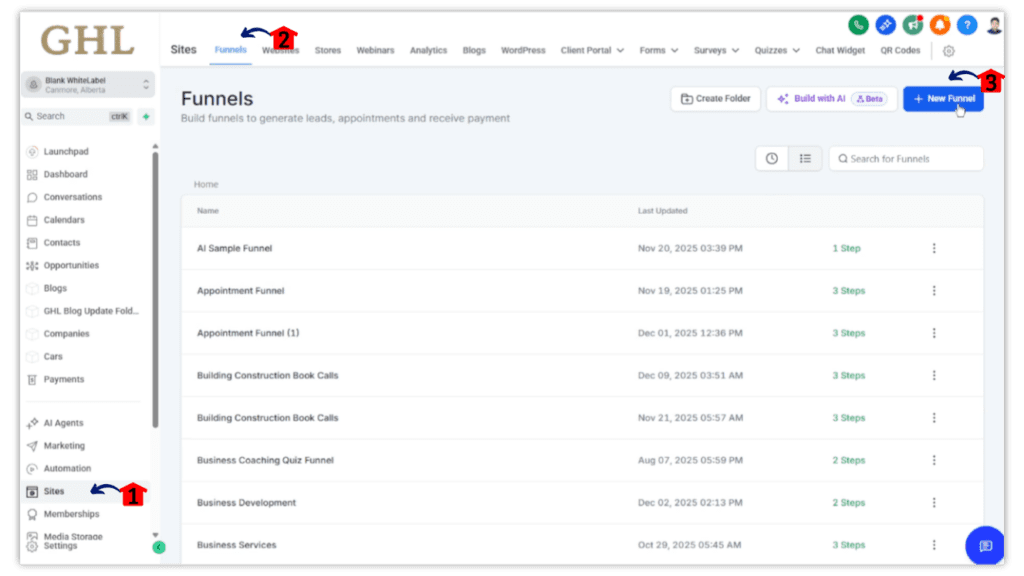
4.1 Click Sites in the main left-hand menu.
- This opens the area where websites and funnels are managed.
4.2 Click the Funnels tab at the top of the screen.
- You’ll now see the funnel list for that sub-account.
4.3 Click + New Funnel.
- This opens the available funnel creation options.
Step 05 – Start a new funnel with Funnel AI (beta)
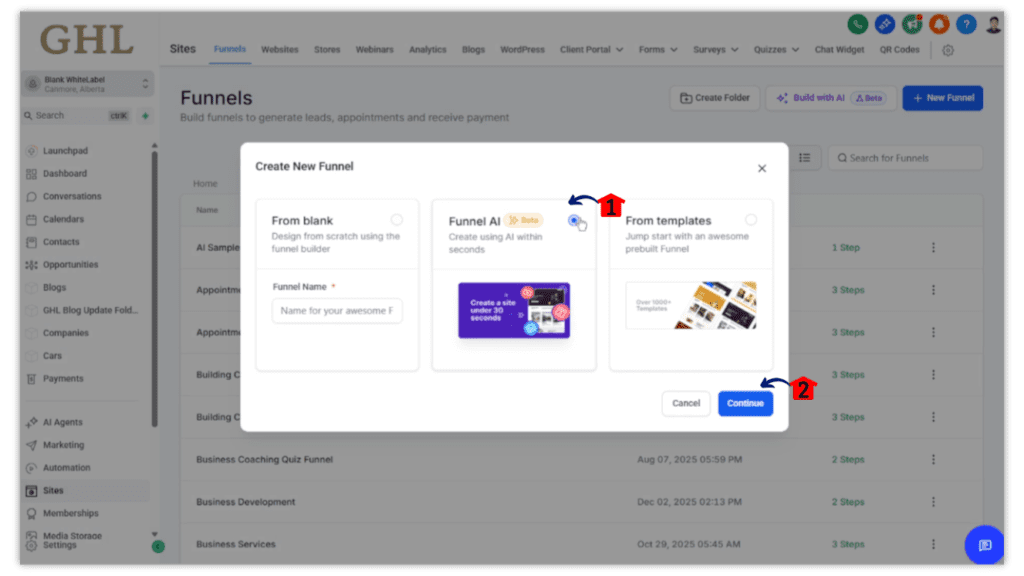
Choose the AI-powered funnel creation option.
5.1 Select Funnel AI (beta) from the list.
- This opens the setup flow for the GoHighLevel AI funnel builder.
5.2 Click Continue.
- You’ll move into the AI funnel creation experience.
Step 06 – Generate your funnel content with Assist or Build mode
Choose how you want AI to help create the funnel.
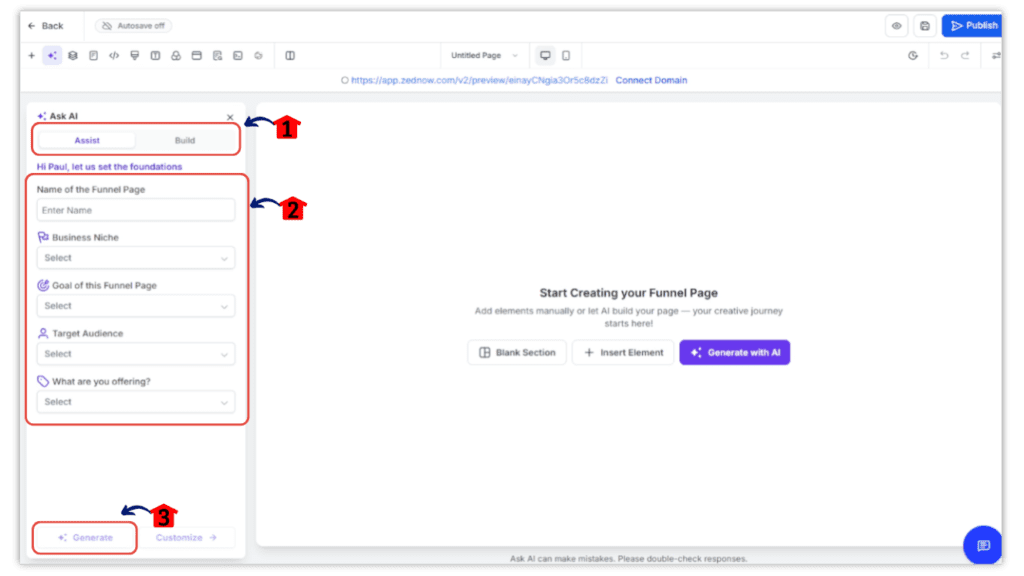
6.1 Select either Assist or Build mode.
- Assist gives you guided help through the setup process.
- Build lets you create the funnel from your text prompt or description.
6.2 Complete the wizard steps or enter your text description.
- The more specific your input is, the better the GoHighLevel AI funnel builder can shape the page content.
6.3 Click Generate.
- The system will create your funnel page content based on the information you provided.
Step 07 – Refine your page and publish the funnel
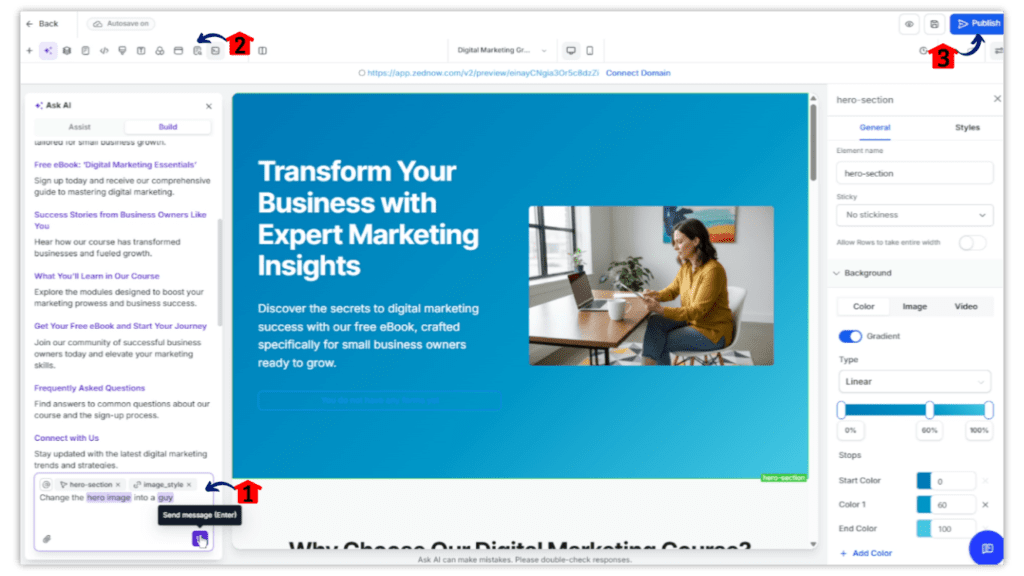
After generation, review the page and make final improvements before going live.
7.1 Use Chat Mode to edit and refine your page.
- This helps you adjust copy, structure, and messaging without rebuilding the page manually.
7.2 Open the page settings panel and review the SEO suggestions.
- This gives you a chance to improve search visibility before publishing.
7.3 Click Publish.
- Your funnel will go live with the updates made in the GoHighLevel AI funnel builder.
What to Review First After the AI Builds the Funnel
Alright, your funnel is generated.
Now what?
This is where most people either make it better… or completely mess it up.
The GoHighLevel AI funnel builder gives you a solid starting point, but you still need to review the right things before you hit publish. Not everything. Just the parts that actually matter.
Start with the headline.
Your headline is the first thing people see. If it’s vague, confusing, or sounds like it was written by a robot, people are gone. The GoHighLevel AI funnel builder might give you something decent, but you want to make sure it clearly answers one question:
👉 “What am I getting here?”
Next, look at your call to action.
What do you want people to do?
- Book a call?
- Sign up?
- Download something?
Make it obvious. No guessing. The GoHighLevel AI funnel builder will add buttons, but it’s your job to make sure they’re clear and specific.
Then check the overall flow of the page.
Scroll through it like you’re a visitor seeing it for the first time:
- Does it feel simple?
- Or does it feel cluttered?
- Is it easy to follow?
If it feels busy, it probably is. Clean wins here.
Now take a quick look at your offer.
This is a big one.
Even if the GoHighLevel AI funnel builder sets up the structure, it cannot fully understand your value. You need to make sure your offer is clear, specific, and actually appealing. No vague promises. Say exactly what people get.
Finally, check for basic trust elements.
You don’t need anything fancy, but you do need:
- your business name
- a way to contact you
- maybe a testimonial or two if you have them
These small things make a big difference.
At this stage, do not aim for perfect.
You’re just making sure your funnel makes sense, feels clear, and gives people a reason to take action. That’s how you get real value from the GoHighLevel AI funnel builder without getting stuck tweaking things for days.
What You Should Customize Before You Publish
This is where your funnel starts to feel like yours.
The GoHighLevel AI funnel builder gives you a strong base, but if you just publish it as-is, it’s going to feel generic. And generic funnels do not convert well.
You don’t need to change everything. Just focus on the pieces that actually move the needle.
Start with the copy.
The GoHighLevel AI funnel builder will generate words for you, but they are not your voice. Read through it and tweak anything that feels off. Make it sound like how you actually talk to your customers.
You don’t need to be fancy. Just be clear.
Next, dial in your offer.
This is not the place to be vague. Instead of saying:
👉 “Get better results”
Say:
👉 “Book a free 15-minute strategy call to fix your lead flow”
See the difference?
The GoHighLevel AI funnel builder sets the structure, but your offer is what makes people care.
Now update your branding.
This is quick but important:
- add your logo
- use your brand colors
- swap in real images if you have them
Even small changes here make the funnel feel more legit.
Then check your form.
Do not ask for too much. The GoHighLevel AI funnel builder might include a standard form, but you should simplify it if needed. Name, email, maybe phone. That’s usually enough.
The easier it is to fill out, the more people will actually complete it.
Also, make sure your next step is clear.
What happens after someone opts in?
- Do they see a thank you page?
- Do they get an email?
- Are they sent to a calendar?
The GoHighLevel AI funnel builder helps you build the front end, but you still need to make sure the backend flow makes sense.
And finally, check mobile.
A lot of people skip this.
Open your funnel on your phone and scroll through it:
- Is the text easy to read?
- Are buttons easy to tap?
- Does anything look broken?
If it’s clunky on mobile, you’ll lose people fast.
The goal here is simple.
Take what the GoHighLevel AI funnel builder created… and turn it into something that feels real, clear, and ready to use.
Common Mistakes Beginners Make With AI Funnels
Let’s save you some headaches here.
The GoHighLevel AI funnel builder makes things faster, but it does not make you immune to bad decisions. And there are a few mistakes that show up over and over again.
First one? Trusting the AI too much.
Yes, the GoHighLevel AI funnel builder gives you a solid draft. But if you copy, paste, and publish without reviewing anything, your funnel will feel generic. People can tell when something sounds off, even if they can’t explain why.
You still need to step in and make it yours.
Second mistake… saying too much.
A lot of beginners think more words = more convincing. It’s the opposite.
When your page is packed with text, people do not read it. They skim, get confused, and leave. The GoHighLevel AI funnel builder might give you multiple sections, but you do not have to keep everything. Cut what you do not need.
Clear beats clever every time.
Third, weak calls to action.
If your button says something like “Submit” or “Click Here,” you’re leaving conversions on the table. The GoHighLevel AI funnel builder gives you buttons, but you need to make them specific and clear.
Think:
- “Book Your Free Call”
- “Get My Free Guide”
- “Start My Trial”
Tell people exactly what happens next.
Next mistake… forgetting the backend.
This one hurts.
You build the funnel, it looks good, someone opts in… and nothing happens. No email. No follow-up. No next step. The GoHighLevel AI funnel builder helps with the front end, but you still need to connect forms, automations, or calendars.
If nothing happens after the click, the funnel is broken.
And finally, trying to make it perfect before going live.
This one keeps people stuck for weeks.
You tweak colors, rewrite sections, adjust spacing… and never actually publish. The whole point of using the GoHighLevel AI funnel builder is speed. Use it.
Get it live. Then improve it.
Because a simple funnel that is live will always beat a perfect funnel that never sees the light of day.
How to Make Your First Funnel More Effective Without Making It Complicated
This is the part where people usually get themselves in trouble.
They build the funnel, then start piling on extra stuff they do not need. More sections. More buttons. More offers. More “just in case” ideas. Before long, the page looks like a garage sale.
Do not do that.
The GoHighLevel AI funnel builder works best when you keep the funnel focused. One funnel. One goal. One clear next step.
If you want your first funnel to work better, start there.
Make sure the page answers a few simple questions fast:
- What is this?
- Who is it for?
- Why should I care?
- What do I do next?
That’s it. You do not need a twenty-part masterpiece. You need a page that makes sense in about five seconds.
The GoHighLevel AI funnel builder helps by giving you structure, but you still need to trim the fat. If a section does not support the goal of the page, cut it. If a sentence sounds clever but confusing, rewrite it. If the call to action is buried halfway down the page, bring it up where people can see it.
Another smart move is to keep your offer tight.
Do not try to sell three things at once. Do not send people in five different directions. The GoHighLevel AI funnel builder gives you a base to build on, but clarity is still your job. A simple offer with one strong call to action will usually beat a messy page with too many options.
And here’s one more thing people forget.
Test the funnel yourself.
Click the buttons. Fill out the form. Open it on your phone. Read it like you are a stranger seeing it for the first time. The GoHighLevel AI funnel builder can save you a pile of setup time, but it cannot notice the little gaps the way you can.
Simple wins here.
You do not need a funnel that looks like it was built by a team of twenty. You need a funnel that is clear, clean, and easy to act on. That’s how you make your first version more effective without turning it into a science project.
Why Starting With AI Is Smarter Than Starting From Scratch
There’s this weird idea floating around that doing everything manually is somehow the “better” way.
It’s not.
When you’re building your first funnel, starting from scratch usually does not make you more strategic. It just makes you slower. You spend more time guessing, more time fiddling, and more time trying to invent a structure that already exists.
That’s why the GoHighLevel AI funnel builder makes so much sense for beginners.
The GoHighLevel AI funnel builder helps you skip the hardest part, which is getting started. Instead of wrestling with a blank screen, you get a draft you can shape, improve, and make your own. That means less friction, less second-guessing, and a much better shot at actually finishing the thing.
And let’s be honest. Finished beats perfect.
Using the GoHighLevel AI funnel builder is not lazy. It’s practical. It’s the same reason people use templates, checklists, and proven systems. You are not cheating. You are just cutting out the wasted time.
That matters even more when you’re new.
When you’re still learning how funnels work, the last thing you need is a giant pile of setup decisions. The GoHighLevel AI funnel builder gives you momentum first, then lets you learn by improving something real. That’s a whole lot easier than trying to build the entire machine while also figuring out how the machine works.
So no, starting with AI is not taking the easy way out.
It’s taking the smart way in.
And for a first funnel, that’s usually the difference between getting something live this week… or still “working on it” a month from now.
Conclusion
Your first funnel does not need to start with a blank page.
That’s the big win here.
The GoHighLevel AI funnel builder gives you a faster way to get moving when you do not want to waste hours building every section by hand. Instead of getting stuck in setup mode, you can use the GoHighLevel AI funnel builder to create a solid starting point, clean it up, and turn it into something that fits your offer.
That matters because momentum is everything when you’re new.
You do not need a perfect funnel. You need a funnel that is clear, functional, and live. Once that’s in place, you can improve the copy, test the buttons, tighten the offer, and make the whole thing better over time. That’s the smarter way to build.
So if you’ve been putting this off because starting from scratch feels like too much, the GoHighLevel AI funnel builder is a pretty solid way to get out of your own way and finally get that first funnel built. And if you’re already using GoHighLevel, this is one of the easiest ways to stop spinning your wheels and start turning ideas into something real.